Reliance Jio has partnered with Canva to provide premium design tools to eligible Jio customers in India. Under this offer, eligible users can get Canva Pro or Canva Pro Lite for up to 12 months without paying an additional subscription fee. The plan available to a user depends on the Jio recharge plan they have selected.
The Jio users can now get Canva Pro subscription for free offer is useful for people who regularly create social media posts, presentations, posters, school projects, marketing materials and other digital designs. The offer is available through supported Jio recharge channels, and eligible users can activate the benefit through the MyJio app.
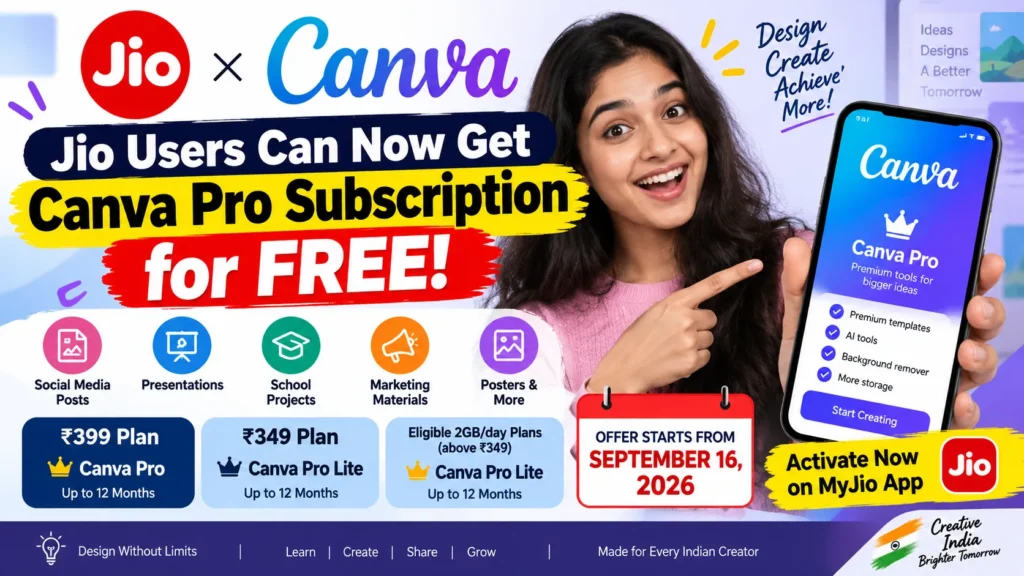
According to the provided information, the offer is worth up to Rs 4,000 and is available from September 16, 2026. However, users should check their MyJio account to confirm whether the Canva benefit is available for their particular recharge plan.
Jio Canva Pro Free – Overview
| Details | Information |
|---|---|
| Offer | Free Canva Pro / Pro Lite |
| Provider | Reliance Jio |
| Partner | Canva |
| Benefit period | Up to 12 months |
| Rs 399 plan | Canva Pro |
| Rs 349 plan | Canva Pro Lite |
| Activation | MyJio app |
| Offer availability | From September 16, 2026 |
| Additional subscription charge | No |
Which Jio Plans Are Eligible for the Canva Offer?
The Canva subscription depends on the Jio recharge plan used by the customer. Not every Jio plan provides the same Canva benefit. Some eligible plans provide Canva Pro, while others provide Canva Pro Lite.
| Jio Recharge Plan | Canva Benefit |
|---|---|
| Rs 399 plan | Canva Pro for up to 12 months |
| Rs 349 plan | Canva Pro Lite for up to 12 months |
| Eligible 2GB/day plans above Rs 349 | Canva Pro Lite |
The Rs 399 plan provides Canva Pro for up to 12 months, according to the provided source. The Rs 349 plan and eligible 2GB/day plans above Rs 349 provide Canva Pro Lite for up to 12 months.
Eligible users do not need to pay separately for the Canva subscription under this offer. The benefit can be activated through supported Jio recharge channels, subject to eligibility.
How to Claim Free Canva Pro or Pro Lite
Eligible Jio customers can check the offer from the MyJio app. Once the Canva benefit becomes available on the account, users can follow the activation instructions displayed in the app.
Follow these steps:
- Open the MyJio app on your smartphone.
- Log in with your Jio number if you are not already logged in.
- Check the available benefits or offers associated with your Jio account.
- Look for the Canva Pro or Canva Pro Lite benefit.
- Select the Canva offer and follow the instructions shown on the screen.
- Complete the activation process as instructed.
- After successful activation, use the Canva subscription according to the applicable plan.
There are no additional charges for the complimentary Canva subscription under the offer, as stated in the provided source. Users should follow the activation process shown in their MyJio account rather than assuming that every Jio customer automatically receives Canva Pro.
Canva Pro vs Canva Pro Lite: What Is the Difference?
Both Canva Pro Lite and Canva Pro provide access to premium Canva resources, but Canva Pro offers more advanced features and higher limits.
| Feature | Canva Pro Lite | Canva Pro |
|---|---|---|
| Premium templates, photos, videos and fonts | Yes | Yes |
| Background remover | Yes | Yes |
| Print-ready exports | Yes | Yes |
| Cloud storage | 50GB | 100GB |
| Brand Kit | Basic, up to 3 kits | Advanced, up to 5 kits |
| Content Planner | No | Yes |
| Magic Resize | Limited/not included | Yes |
| AI tools | Basic access | Full AI suite with higher limits |
The main difference is that Canva Pro provides a broader set of advanced tools and higher limits. For users who only need premium templates, background removal and basic design features, Canva Pro Lite may be sufficient. Users who regularly work on professional designs may find the additional Pro features useful.
What Can Jio Users Create With Canva?
Canva can be useful for students, content creators, small businesses, entrepreneurs and people who need to create digital designs without advanced graphic design skills.
With Canva, users can create social media posts, presentations, school projects, posters, marketing materials and festival greetings. Canva’s templates can also help users start a design without creating everything from scratch.
The platform also supports Hindi and several other Indian languages. This can make the service more convenient for users who prefer creating content in an Indian language rather than English.
For bloggers and website owners, Canva can also be useful for creating social media graphics, promotional images and other visual content. The exact features available will depend on whether the user receives Canva Pro or Canva Pro Lite.
Jio and Canva Partnership
The partnership between Jio and Canva brings Canva’s design platform to Jio’s customer base in India. According to the provided information, the companies aim to make professional design tools more accessible to students, creators, entrepreneurs and small businesses.
Eligible Jio users can start claiming the Canva benefit from September 16, 2026, through supported recharge channels. Users should check their MyJio account to see the specific Canva benefit available to them.
Important Instructions for Jio Users
Before trying to activate the benefit, users should check whether their Jio recharge plan is eligible. The Canva subscription level depends on the plan, so a customer receiving Canva Pro Lite should not expect the same features and limits available with Canva Pro.
It is also important to complete the activation process through the supported Jio channel. If the offer does not appear in the MyJio app, the provided source does not specify an alternative manual activation method. Therefore, users should rely on the offer and instructions displayed for their Jio account.
Conclusion
The Jio users can now get Canva Pro subscription for free offer gives eligible customers access to Canva premium tools for up to 12 months. Depending on the Jio recharge plan, users can receive either Canva Pro or Canva Pro Lite without paying a separate subscription charge.
The Rs 399 plan is listed with Canva Pro for up to 12 months, while the Rs 349 plan and eligible 2GB/day plans above Rs 349 provide Canva Pro Lite. Eligible users can check and activate the benefit through the MyJio app.
Users who regularly create designs for social media, education, business or personal projects can check their Jio account to see whether this benefit is available.
FAQs
1. Can Jio users get Canva Pro for free?
Eligible Jio users can get Canva Pro or Canva Pro Lite for up to 12 months, depending on their recharge plan.
2. Which Jio plan gives Canva Pro?
The provided information lists the Rs 399 Jio plan as eligible for Canva Pro for up to 12 months.
3. How can I claim the Canva offer?
Eligible users can check and activate the benefit through the MyJio app by following the instructions shown on their account.
4. Is Canva Pro Lite also included in the offer?
Yes. The Rs 349 plan and eligible 2GB/day plans above Rs 349 are listed as eligible for Canva Pro Lite for up to 12 months.
5. Do I need to pay separately for Canva?
No. The provided information states that eligible users do not have to pay separately for the complimentary Canva subscription under the offer.